Python and the JVM - A Love Story
This post was first presented as a talk at PyCon US 2026.
Baby, just say yes!
Teach your Python program(er)s the love language of the JVM with Py4J - a high-performance tool to leverage the power of the JVM from within Python itself for performance, fun and profit.
Take a deep dive into how and when to use Py4J - the core package behind big data projects like Apache PySpark - and common pitfalls and how to avoid them. We’ll take a reality-checked look into Py4J and learn how to use it within real world applications.
Py4J is based on many underlying technologies behind the scenes that enable us to access the JVM and its power from within Python, utilizing Python’s easy APIs with JVM languages’ power to create accessible yet powerful applications that don’t have to compromise on comfortability nor performance.
Introduction and Problem Definition
Pros and Cons of Python
I don’t need to convince anyone who has gotten up to here that Python is a great language. We love it’s simplicity, clean APIs, methodology, code organization tools and ecosystem, you name it. We do know, however, that Python is not the first choice for development when you need a highly performant app. It’s interpreted nature and heavy reliance on runtime create a drawback that we sometimes have to face - Python is not as performant. Throughout the years many attempts to improve the performance benchmarks of the language have been made - from iterators optimizations, different cPython improvements and the most recent experiment of running without the GIL. None of those, however, has seen success in putting Python on the performance game once again.
There are, however, Python projects that are known for their performance - such as numpy and Pandas, and big data processors like Apache PySpark - so how are they doing it? The secret sauce is multilingualism - speaking (or in our case writing) in multiple languages. Today we’ll take a look into one of these multilingualism options - connecting Python and the JVM to access the speed of JVM based languages like Java and Scala.
The Grass can be Greener: Performance Comparison
- For certain use cases, including data analysis and large scale data processing, Scala can perform certain tasks up to 10 times faster than similar Python code (source).
- On a big data scale of millions of events that need to be processed per second this can be a game changer.
Best of Both Worlds?
So we are looking for a solution that will give us access to the JVM (in practice this translates into requiring access to the classpath objects) from inside of a Python runtime. It needs to have a minimal footprint in memory overhead and avoid being a performance bottleneck. So, hopefully, we want a solution that is as simple as possible. The keyword runtime up there gives me the chills - this is not as simple as running another program as a subprocess from within Python, we need something a little cleverer that will enable access to JVM objects in realtime from the Python process.
Basic Py4J Architecture
Basic Usage
Py4J is our best of both worlds solution. It builds a simple yet reliable bridge between two apps, one Pythonian and one JVM based, to create a runtime access to the JVM from within a Python app.
The trick, if you will, is to set up a server in the JVM that acts as an entry point to the classpath. The servers acts as a registry for class path objects.
Let’s see some JVM code:
1
2
3
4
5
6
7
8

import py4j.GatewayServer;

object App {
    def main(args: Array[String]): Unit = {
        val gatewayServer = new GatewayServer()
        gatewayServer.start()
    }
}
As you can see we are importing from a package called py4j an object named GatewayServer, then initializing it in an main entrypoint object (Scala’s main program syntax).
The server is taking no arguments for initialization at this point - though it can for more complex situations - and then started.
On the JVM side, we are basically done!
Now we can access JVM objects from Python:
1
2
3
4
5

from py4j.java_gateway import JavaGateway

gateway = JavaGateway()
random  = gateway.jvm.scala.util.Random()
print(random.nextInt(10))  # prints a random integer between 1 and 9
We have initialized a JVM gateway object on our python app, and now we have access to objects from the JVM’s classpath! We can now access objects by their full classpath reference with the gateway.jvm objects, like scala.util.Random(), then use it and it’s methods in our program!
As awesome as that might be, this is a little cumbersome and we can improve this code for sure:
1
2
3
4
5
6

from py4j.java_gateway import JavaGateway, java_import

gateway = JavaGateway()
java_import(gateway.jvm, "scala.util.Random")
random  = gateway.Random()
print(random.nextInt(10))  # prints a random integer between 1 and 9
This is a great improvement, but we can do even better :)
If we have a JVM app we built and want to expose directly without having to explicitly import it, we can supply the GatewayServer constructor on the JVM side an object that would be mapped to the Python side’s JavaGateway object’s entry_point parameter:
1
2
3
4
5
6
7
8
9

import py4j.GatewayServer;
import some.very.important.AppObject;

object App {
    def main(args: Array[String]): Unit = {
        val gatewayServer = new GatewayServer(AppObject)
        gatewayServer.start()
    }
}
Now we can access the AppObject (let’s say it has a .run() method):
1
2
3
4
5

from py4j.java_gateway import JavaGateway

gateway = JavaGateway()
app = gateway.entry_point
app.run()
Now that’s better, with this we can work!
Behind the Scenes
Let’s take a look at how things are running behind the scenes:
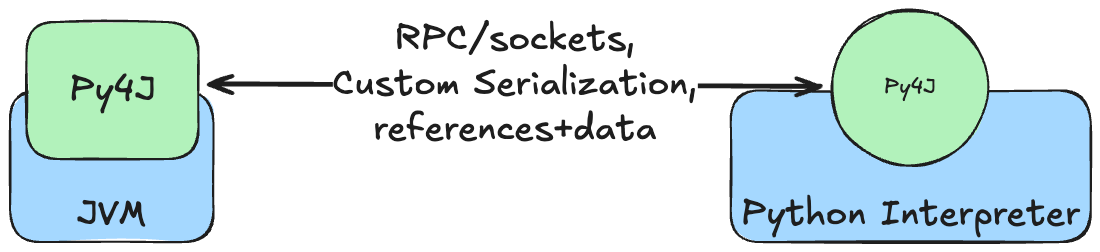
We can see the JVM server and the gateway object on the Python side, and note a few extra details: Py4J uses some fancy custom logic to set us up for success - a custom implementation of Remote Procedure Call over raw sockets which is an optimal solution for localized access like this, mitigating latency since in practice we are running two thread of the same app. We also got custom serialization protocol, optimized for passing JVM references around as the main way to provide access to the classpath (if “everything is a reference” sound familiar it’s because cpython handles objects in a very similar manner).

As the docs say,
Py4Jis “A fancy combination of RPC and running python on the JVM”.
Building a real world application with Py4J
- Explore a real world use-case for
Py4Jin a scenario similar to that of PySpark - a highly performant application that requires a Pythonian interface for widespread usage. - Build an application step by step and discuss pitfalls in different stages of the app building and how to avoid them.
Background
Now that we understand what’s going on, we can see it all in action! During my time at Hunters.security, I lead the product’s ingestion efforts - meaning we were responsible for all of the data infrastructure of the company. Our product (a SOC platform) collected logs from various other security products (like firewalls and other SaaS products the customers used), and our systems had to ship this data to a datalake (like Snowflake). Our main data platform was an internal fork of Apache Spark. Spark has some major benefits when dealing with large volumes of data, and it’s an industry standard for processing these types of workloads. Our fork focused on the performant part of Spark - the Scala backend of the engine. This meant that some features of Spark were not available for us and needed to be developed internally, one of such features were PySpark, or rather - it’s use case. Our Scala dev team of experts was small and focused, but the users of the systems included many analysts and content developers that developed plugins and such for the system, and we needed to lower the bar for adding features to the system. The obvious solution to Spark users is using PySpark as a wrapper to the Scala app and exposing an API to do that, so we developed it internally (mistakes had been made, startup economy is weird). This is, of course, where
Py4Jcame into the picture. WithPy4Jwe could keep our Scala dev team working on the core product while exposing an easy to extend API for other teams that they could develop to as well. The main feature of this API was to run Spark workflows on demand via a REST API. Let’s see how it’s done.
From the Ground Up
The base of our application is of course our Spark fork. Around it we are building an entrypoint object that we want to expose to our Python users, it is called the OnDemandSimulatorApp:
1
2
3
4
5
6
7
8
9
10
11
12
13
14
15
16
17
18

package org.io.hunters.ai.scala.ingestion;

import org.io.hunters.ai.scala.models.JobRequest;
import org.apache.spark.sql.Dataset;
import org.apache.spark.sql.Row;


object OnDemandSimulatorApp {
    def run(request: JobRequest): Dataset[Row] = {
        val sparkSession = SparkSession.builder()
            .appName("OnDemandSimulatorApp")
            .master("local")
            .getOrCreate()

        val job = request.toSparkJob
        return job.run(sparkSession).result
    }
}
A caveat to consider at this point is - why do we need a Python wrapper if all we want is a REST API? Wouldn’t a Scala API framework do the job? Well, it would - but we want it’s easy extendability as well, and Scala does not provide that benefit (even far from it, if you are not familiar with effect based libraries which are the standard for Scala REST frameworks).
The next piece of the puzzle is to expose the application to Py4J’s RPC server so that our Python application can access it and its methods:
1
2
3
4
5
6
7
8
9

import py4j.GatewayServer;
import org.io.hunters.ai.scala.ingestion.OnDemandSimulatorApp;

object App {
    def main(args: Array[String]): Unit = {
        val gatewayServer = new GatewayServer(OnDemandSimulatorApp)
        gatewayServer.start()
    }
}
A point of consideration that arises from this step of the process is which component to surface to the server - as we also need other objects and not only the app itself - we need serializers and deserializers for requests parsing, control signals for the running app, and more, so which do we choose? Our choice was to expose only the main function of the application and leave the rest in the background. Our ball was readability on the Python side so we wanted to encapsulate as much as we could in the Scala entrypoint app instead of creating custom serializers and data protocols.
The next step is the Python setup. This is where the heavy guns come out - Py4J’s power comes into play here, big time (a freudian slip I had while writing this is bug time, who would’ve imagined).
1
2
3
4
5
6
7

from py4j.java_gateway import JavaGateway, java_import

gateway = JavaGateway()
java_import(gateway.jvm, "scala.org.io.hunters.ai.scala.models.*")

# now we can use it like that:
results = gateway.app.run(gateway.jvm.JobRequest(input_definition, query))
The big decidable when playing out this section of our evil plan is which JVM objects do we want to import and which are we leaving for the user of our gateway to reference themselves. My experience taught me to import only custom objects and references that we want available in our app, and keep standard library imports out. The risk of creating an ambiguous reference - be it a real name collision like spark or a mental collision like Option and Optional - is real. It’s better to keep things explicit to make them more readable.
Another caveat I encountered here is importing scala references which required some special handling because of the way it is compiled to the classpath:
1
2
3
4
5
6
7
8

def get_scala_object(scala_object_reference: str):
    # Scala objects are compiled to classes with a '$' suffix and a MODULE$ field
    cls = jvm.java.lang.Class.forName(scala_object_reference + "$")
    field = cls.getDeclaredField("MODULE$")
    return field.get(None)


ScalaJobRequest = get_scala_object("org.io.hunters.ai.scala.models.JobRequest")
With that, our job is basically done! We can wrap the use of the gateway server with any application we wish to make!
Our architecture at this point is looking quite similar to this diagram: ![pyspark arch.png]
Beyond Py4J - what else can you do
The sky’s the limit! Now we can use Py4J for all sorts of fun ideas and solutions.
Integrating FastAPI
One idea that makes use of the tool we just learnt is integrating the application into a FastAPI server to make it accessible from the web.
If we abstract the function parameters and their structure we can later use this as an on-demand operation interface for Spark! In a context of microservices architecture this makes a lot of sense and in Hunters we use it as an entrypoint to test out customer configurations’ integration with our systems.
1
2
3
4
5
6
7
8
9
10
11

from py4j.java_gateway import JavaGateway, java_import
from app.FastAPIApp import app

gateway = JavaGateway()
java_import(gateway.jvm, "scala.org.io.hunters.ai.scala.models.*")


@app.get("/on_demand_job")
def on_demand_job(input_location, query) -> list[dict]:
    results = gateway.app.run(gateway.jvm.JobRequest(input_location, query))
    return [dict(row.asMap().asTuples()) for row in results]
Creating an architecture similar to this diagram: ![fn arch.png]
Separating Server and Client
Another way we can utilize Py4J’s power is by separating our JVM server from our Python client, similar to the architecture of Spark Connect:
1
2
3
4
5
6
7
8
9
10
11

from py4j.java_gateway import JavaGateway, GatewayParameters


gateway = JavaGateway(
    gateway_parameters=GatewayParameters(
        address="192.168.1.100",
        port=25333
    )
)

# The rest of the code is identical(!)
Creating an architecture similar to this diagram: ![spark connect arch.png]
The main benefit we can gain from this architecture is offloading the computing-heavy operations from our client machine and off to the server. Different services and users can now perform powerful transformations on large amounts of data from simple machines, lifting the full power of Spark.
You might notice that Spark Connect is using gRPC while we are using Py4J’s internal RPC protocol - this is not the only implementation detail Spark Connect has improved from Py4J! It’s also using Arrow for data serialization, a custom serialization protocol for Spark logical plans (de-facto objects representing job structures), and more.